D YEDEMC Fiber Optic Cable Testers & Mini Pro OTDR Equipment

D YEDEMC builds fiber optic test and splicing equipment — including a dedicated fiber optic cable tester line — for working technicians and small contractors who need real diagnostic capability without enterprise-tier price tags. The lineup spans 16 products across five categories — OTDR testers, optical power meters, fiber identifiers, fusion splicers, and connector cleaning kits — with over 1,300 verified reviews on the power meter line alone and a 4.4/5 average across the Mini Pro OTDR series. These are tools designed for FTTx installs, access network maintenance, and CATV work: field conditions, not lab benches. Visit the official D YEDEMC website to explore the full catalog.
✓ Field-verified specs✓ Multi-function tools✓ Built for working techs
Shop the Full D YEDEMC Lineup on Amazon
D YEDEMC Mini-Pro 1310/1550nm SM OTDR Mulit-Function Tester Built in OPM/OLS / RJ45 Test/VFL Test Rang 5m-60Km Dynamic Range 24dB/22dB Connector UPC (YD-3000-UPC) D YEDEMC Fiber Optic Cable Tester Portable Optical Fiber Power Meter FC/SC/ST Universal Interface Integrated OPM D YEDEMC Live Optical Fiber Identifier with Wave Respond 800-1700nm Built in VFL FTTH Tool
Specs You Can Actually Verify Specs You Can Actually Verify

Every D YEDEMC product publishes documented specs — dynamic range, splice loss, dead zones, accuracy — that match what users report in 1,300+ Amazon reviews across the lineup.

One Device Replaces Several Tools One Device Replaces Several Tools

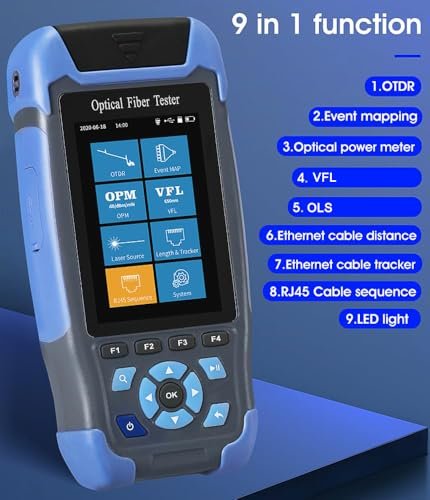
The Mini-Pro OTDR series packs OTDR, optical power meter, VFL, optical light source, and RJ45 tester into a single handheld unit — fewer items to charge, carry, and dig out of a bag at 40 feet up a ladder.

Built for Job Sites, Not Just Benches Built for Job Sites, Not Just Benches

From the 140g OPM-VFL-1 that runs 72+ hours on two AA batteries to the Ai-9 splicer rated for operation up to 16,400 feet (5,000m) altitude, D YEDEMC equipment is specified for the conditions technicians actually work in.

Endorsed by the Networking Community Endorsed by the Networking Community

Users on r/networking called the Mini-Pro OTDR "an OTDR that doesn't feel like crap garbage" — direct community language that carries more weight than any marketing claim we could write here.

Five Categories, One Complete FTTH Toolkit

D YEDEMC's five product lines cover every stage of fiber optic work — from tracing faults and verifying splice quality to identifying live fibers and keeping connectors clean. Whether you're running an OTDR on a new FTTx build or doing a quick power check on a service call, these tools are designed to work together as a coherent kit rather than a collection of unrelated instruments.

The D YEDEMC Tools Techs Reach for First

These 12 products represent the core of what D YEDEMC does well — the OTDR testers that handle daily FTTx and access network runs, the power meters that techs keep clipped to a belt loop, the splicer that contractors run through 200+ splices on a single charge, and the identifier that works on live fiber without taking the link down. Spread across all five categories, they're the instruments that show up consistently in field kits and community recommendations.

D YEDEMC Mini-Pro 1310/1550nm SM OTDR Mulit-Function Tester Built in OPM/OLS / RJ45 Test/VFL Test Rang 5m-60Km Dynamic Range 24dB/22dB Connector UPC (YD-3000-UPC)
fiber optic otdr tester

Mini-Pro OTDR YD-3000 UPC

See on Amazon
D YEDEMC Fiber Optic Cable Tester Portable Optical Fiber Power Meter FC/SC/ST Universal Interface Integrated OPM
fiber optic power meter

OPM-VFL-1 All-in-One Power Meter

See on Amazon
D YEDEMC Live Optical Fiber Identifier with Wave Respond 800-1700nm Built in VFL and Optical Power Meter OPM Functions FTTH Tool (YD-3309D)
optical fiber identifier

YD-3309D Identifier with OPM

See on Amazon
D YEDEMC SM&MM Six Motor Core Alignment Fiber Fusion Splicer Automatic FTTH Fiber Optical Welding Splicing 5S Heating 15S (Ai-9)
fiber fusion splicer

Ai-9 Core Alignment Fusion Splicer

See on Amazon
D YEDEMC Fiber Optic Connector Cleaning Kit with 1.25mm / 2.5mm Cleaner Pens & Cassette and Replacement Tapes for FC SC ST LC MU Connectors
fiber optic connector cleaning kit

CLK-1 Connector Cleaning Kit

See on Amazon
D YEDEMC Mini-Pro 1310/1550nm SM OTDR Mulit-Function Tester Built in OPM/OLS / RJ45 Test/VFL Test Rang 5m-60Km Dynamic Range 24dB/22dB Connector APC (YD-3000-APC)
fiber optic otdr tester

Mini-Pro OTDR YD-3000 APC

See on Amazon
D YEDEMC Fiber Optic Cable Tester Portable Optical Fiber Power Meter FC/SC/ST Universal Interface Integrated OPM
fiber optic power meter

OPM-VFL-Li Rechargeable Power Meter

See on Amazon
D YEDEMC Live Optical Fiber Identifier with Wave Respond 800-1700nm Built in VFL FTTH Tool
optical fiber identifier

JW3306D Live Fiber Identifier

See on Amazon
D YEDEMC SM&MM Fusion Splicer - High-Precision One-Step Fiber Cutter
fiber fusion splicer

Ai-20A Splicer with Built-in Cleaver

See on Amazon
D YEDEMC Mini-Pro 1310/1550nm SM OTDR Mulit-Function Tester Built in OPM/OLS / RJ45 Test/VFL Test Rang 5m-60Km Dynamic Range 28dB/26dB Connector APC (YD-5100-APC)
fiber optic otdr tester

Mini-Pro OTDR YD-5100 APC 28dB

See on Amazon
D YEDEMC Mini-Pro 850/1300nm SM OTDR Mulit-Function Tester Built in OPM/OLS / RJ45 Test/VFL Test Rang 5m-60Km Dynamic Range 22dB/24dB Connector UPC (YD-5100-MM)
fiber optic otdr tester

Mini-Pro OTDR YD-5100 Multimode

See on Amazon
D YEDEMC Optical Fiber 1310/1490 / 1550nm PON Power Meter PON Network Detection Online Fiber Tester with FC/SC Adapter (Connector Type APC) (YD-300A)
fiber optic otdr tester

YD-300A PON Power Meter APC

See on Amazon
fiber optic otdr tester

Mini-Pro OTDRs for FTTx and Access Network Work

The Mini-Pro OTDR lineup covers single-mode, multimode, and live-fiber testing across seven models — from the 24dB YD-3000 series entry point to the 28dB/26dB YD-5100 APC flagship with a 5.0-inch touchscreen and 100km test range. Every model includes built-in OPM, OLS, VFL, and RJ45 testing in a single handheld unit weighing under 1kg. The 3-meter event dead zone on the YD-3000 series and 1.5-meter dead zone on the YD-5100 series mean you can resolve closely spaced events in dense FTTH splice enclosures — which is exactly where these tools get used.

What to look for

  • Fiber type first — single-mode (G.652) jobs need the 1310/1550nm models; multimode in-building runs require the YD-5100 MM at 850/1300nm
  • Dynamic range matches your run length — 24dB handles typical FTTx drops and access network builds under 60km; 28dB/26dB on the YD-5100 APC extends to 100km with more headroom for cascaded splitters
  • Live fiber requirement — standard 1310/1550nm OTDRs cannot test active fiber; choose the 1610nm models (YD-3000-1610-UPC or APC) if you need to test without taking the link down
  • Connector type on your network — UPC and APC connectors are not interchangeable; the wrong model will give you a large back-reflection reading that's actually just connector mismatch
  • Dead zone vs. screen size trade-off — the YD-3000 series has a 3.5-inch non-touch LCD with a 3m event dead zone; the YD-4000 and YD-5100 step up to 4.3-inch or 5.0-inch touch screens with shorter dead zones (2.5m and 1.5m respectively)

In this category

  • Mini-Pro OTDR YD-5100 APC 28dB — the highest dynamic range in the lineup at 28dB/26dB with a 5.0-inch touchscreen, 1.5m event dead zone, and 100km test range on FC/APC with SC/ST/LC adapters included
  • Mini-Pro OTDR YD-4000 26dB Touch — 26dB/24dB dynamic range on a 4.3-inch IPS touchscreen with a 2.5m event dead zone, 5m–100km range, and bundled FC/APC and FC/UPC adapters for mixed-connector jobs
  • Mini-Pro OTDR YD-3000 UPC — the core 1310/1550nm single-mode model at 24dB/22dB dynamic range with a 3m event dead zone and interchangeable SC/ST adapters; the most accessible entry point in the lineup
  • Mini-Pro OTDR YD-3000 APC — identical specs to the YD-3000 UPC but with an FC/APC port for networks terminated with APC connectors — the version to choose if your plant is predominantly green connectors
  • Mini-Pro OTDR 1610nm Live UPC — the 1610nm wavelength allows testing on active fiber without disrupting live traffic; 22dB dynamic range and 5m–60km range with FC/UPC connector
  • Mini-Pro OTDR YD-5100 Multimode — 850/1300nm multimode OTDR for in-building and data center fiber with 22dB/24dB dynamic range, 1.5m event dead zone, and a 5.0-inch touchscreen
Browse All Mini-Pro OTDRs on Amazon

Which Mini-Pro OTDR Matches Your Job

The right Mini-Pro OTDR depends on three things: your fiber type (single-mode or multimode), the connector polish on your network (UPC or APC), and whether you need to test active fiber. Get those three right and the rest of the spec differences are secondary. The table below maps each scenario to the correct model.

Single-Mode FTTx and Access Network Work

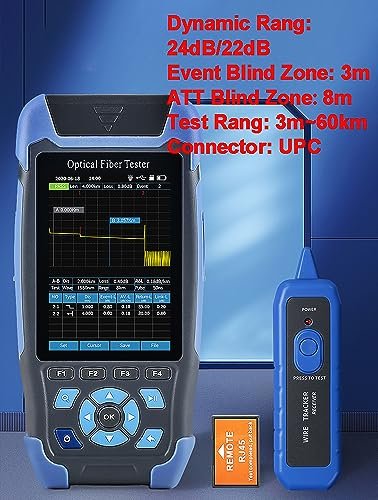
Most FTTx, FTTH, and telecom access network builds run on single-mode G.652 fiber with 1310/1550nm wavelengths. The YD-3000-UPC and YD-3000-APC cover this job — 24/22 dB dynamic range, 3-meter event dead zone, 8-meter ATT dead zone, and a test range of 5 meters to 60 km. The 24 dB dynamic range at 1310nm is enough for typical access network runs and most FTTH builds. The only decision is connector polish: choose UPC if your network uses FC/UPC or SC/UPC connectors; choose APC if your plant runs APC terminations (which is the case for most passive optical networks deployed after 2010). Mixing connector types damages both the instrument port and the mating connector, so get this right before you order.

When You Need More Dynamic Range

The YD-4000 steps up to 26/24 dB dynamic range at 1310/1550nm, with a slightly shorter event dead zone of 2.5 meters and ATT dead zone of 5 meters compared to the YD-3000 series. That shorter dead zone means you can resolve events closer together — useful in dense splice enclosures. The 4.3-inch IPS touch screen is also a meaningful upgrade from the YD-3000's 3.5-inch non-touch display. It comes with an FC/UPC connector and an adapter bundle that includes FC/APC, FC/UPC, and SX options, which covers most field connector scenarios without hunting for adapters separately. Test range extends to 100 km, though the 26 dB dynamic range is the more practically useful spec for extended-reach enterprise campus fiber runs.

The YD-5100-APC goes further — 28/26 dB dynamic range at 1310/1550nm, the highest in the Mini-Pro lineup. Combined with its 1.5-meter event dead zone and 5.0-inch touch screen, this is the model for technicians working longer single-mode runs or jobs where tighter dead zone performance matters, like indoor splice trays with closely spaced events. Its 100 km test range and FC/APC connector with LC/SC/ST adapters make it the most capable and flexible instrument in the series.

D YEDEMC Mini-Pro 1310/1550nm SM OTDR Mulit-Function Tester Built in OPM/OLS / RJ45 Test/VFL Test Rang 5m-60Km Dynamic Range

Multimode In-Building Runs

The YD-5100-MM is the only multimode-specific instrument in the D YEDEMC OTDR lineup. It operates at 850/1300nm — the wavelengths used in multimode fiber deployed in data centers, in-building networks, and campus interconnects. Dynamic range is 22/24 dB, event dead zone is 1.5 meters, and test range extends to 100 km (though real-world multimode runs are typically far shorter). The 5.0-inch touch screen and FC/UPC connector with LC/SC/ST interchangeable adapters make it practical for LC-heavy data center environments. If your work is purely single-mode, this is not your instrument. If you're testing OM3 or OM4 multimode runs, it's the only Mini-Pro that will give you accurate results at the right wavelengths.

Testing Active or Live Fiber

Standard OTDRs — including every other model in the Mini-Pro series — cannot test live fiber. Attempting it will damage the instrument. The 1610nm wavelength window is specifically chosen for active fiber testing because it sits outside the standard telecom transmission bands (1310nm and 1550nm), so an OTDR pulse at 1610nm doesn't interfere with live traffic. The YD-3000-1610-UPC and YD-3000-1610-APC are the two models that support this. Dynamic range is 22 dB at 1610nm with 3-meter event and 8-meter ATT dead zones, covering the same 5m–60km test range as the standard YD-3000 series. Choose UPC or APC based on your network's connector type. These are specialty instruments for specific scenarios — if you're working on dark fiber or out-of-service plant, the standard YD-3000 or YD-4000 is the right choice and delivers higher dynamic range.

Mini-Pro OTDR Selection at a Glance

Model Wavelength Dynamic Range Event Dead Zone Screen Best For
YD-3000 UPC / APC 1310/1550nm SM 24/22 dB 3 m 3.5" LCD FTTx drops, access network, standard SM builds
YD-4000 with Adapter 1310/1550nm SM 26/24 dB 2.5 m 4.3" IPS touch Enterprise campus, longer SM runs, adapter flexibility
YD-5100 APC 1310/1550nm SM 28/26 dB 1.5 m 5.0" touch Extended SM runs, dense splice enclosures, highest performance
YD-5100 MM 850/1300nm MM 22/24 dB 1.5 m 5.0" touch Multimode in-building, data center fiber
YD-3000 1610 UPC / APC 1610nm SM 22 dB 3 m 3.5" LCD Active/live fiber testing only

One limitation applies across the entire lineup: none of the Mini-Pro OTDRs can test through a passive splitter. A 1:8 or 1:16 PON splitter introduces 14–18 dB of insertion loss, and even the 28 dB YD-5100 can't characterize an individual subscriber branch beyond the splitter. For fault location on a PON network beyond the split point, a live fiber identifier or PON power meter is the right tool — not an OTDR.

Reading a Mini-Pro OTDR Trace

D YEDEMC Mini-Pro 1310/1550nm SM OTDR Mulit-Function Tester Built in OPM/OLS / RJ45 Test/VFL Test Rang 5m-60Km Dynamic Range

An OTDR trace is a graph with distance on the horizontal axis and signal level in dB on the vertical axis. The Mini-Pro displays this after every test run. Understanding what you're looking at — specifically the difference between normal events and problems — is what turns a trace from a confusing squiggle into a field diagnosis tool.

The Slope Is Your Fiber's Loss Rate

The gradual downward slope across the trace is normal. That's the fiber attenuating the signal as it travels — for a standard G.652 single-mode fiber at 1310nm, you'd expect roughly 0.35 dB per kilometer. At 1550nm, it's lower, around 0.20 dB/km. If your trace shows a steeper-than-expected slope over a section, that section has elevated loss — possibly a tight bend, water ingress, or mechanical damage. The slope doesn't have to drop off a cliff to indicate a problem. An unusually steep section warrants investigation even if the link is still up.

Spikes Are Reflection Events

A sharp spike upward on the trace — followed by a step down — is a reflection event. That's what a connector looks like. Connectors reflect some light back toward the OTDR because of the air gap between ferrule faces. A good SC/UPC connector typically shows about 0.3–0.5 dB of insertion loss at 1310nm on the trace, with a reflection spike above the trace line. An APC connector shows a much smaller reflection (better than -60 dB return loss by design), which is why APC connectors can be harder to spot on a trace — but the insertion loss event is still visible as a step down.

A splice shows up differently: a small step down with no reflection spike above the trace line. That's the signature of a fusion splice. A good fusion splice on single-mode fiber — made with core alignment like the D YEDEMC Ai-9 — should show ≤ 0.05 dB of loss on the trace. The Ai-9's spec target is ≤ 0.02 dB. Any splice showing more than 0.2 dB is a candidate for re-splicing, especially on longer runs where loss budget is tight.

What the Dead Zone Means Practically

The dead zone is the stretch of trace immediately after any strong reflection event where the OTDR can't resolve what comes next. On the YD-3000 series, the event dead zone is 3 meters — meaning if two events are less than 3 meters apart, the second one may not appear as a separate event at all. The ATT dead zone is 8 meters — the distance the OTDR needs before it can accurately measure the loss at the next event after a reflection.

This matters most when you're testing close to the instrument port. The first meter or two of fiber after your launch connector lives inside the ATT dead zone, which is why a launch cable is standard practice — connecting a known good jumper (typically 50–100 feet of fiber) between the OTDR and your network under test pushes your first real event out of the dead zone. Without a launch cable, you may miss or misread the first connector on the link. The YD-4000 and YD-5100 series have shorter dead zones (2.5 m event / 5 m ATT and 1.5 m event / 6 m ATT respectively), which helps in dense enclosures but doesn't eliminate the need for a launch cable at the near end.

The End of Fiber Event

At the far end of the link, you'll see a large reflection spike followed by the trace dropping to the noise floor. That's the end of fiber — the open connector or break reflecting almost all of the signal back. The OTDR measures the distance to this event with an accuracy of ±(1 m + sampling interval + 0.005% × test distance) on the YD-3000 series. For a 5 km link, that's typically within a few meters — accurate enough to locate a break in a buried cable run for dig planning.

Reading the Event List

After a test, the Mini-Pro generates an event list alongside the trace. Each numbered event shows its distance from the OTDR port, its loss in dB, and whether it's classified as a reflection or non-reflection event. This is faster than manually reading the trace for multi-event links — a 200-splice run would be unreadable trace-only. The iLOM (Event Map) mode displays this same data as a graphical layout, which is easier to hand off to a client or include in a build acceptance report. Traces are stored in SOR standard file format, readable by most OTDR analysis software on a PC.

One thing worth knowing: if your readings look off and you've checked everything else, clean the connector on the OTDR port first. A contaminated launch connector is the most common cause of unexplained high loss readings and ghost events near the start of the trace. The Mini-Pro's built-in OPM can confirm whether the launch power is within expected range before you spend time chasing a software setting.

fiber optic power meter

Optical Power Meters for Field Link Verification

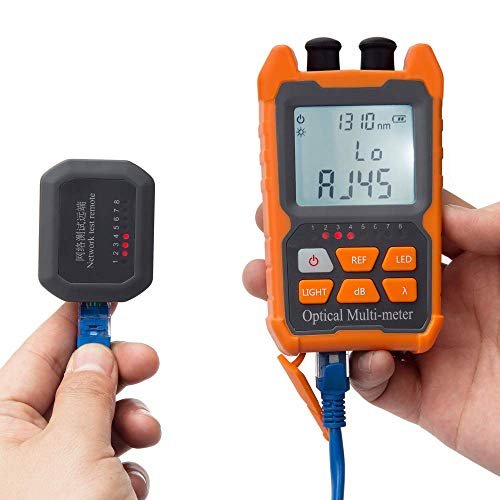
D YEDEMC's power meter line does more than measure optical power — each unit integrates OPM, VFL, and RJ45 testing in a 140g device that runs on standard AA batteries for 72+ hours or USB-rechargeable Li-ion depending on the variant. The InGaAs detector covers 8 standard wavelengths (850 through 1650nm) at ±0.05dB accuracy across a -70 to +6dBm test range, which handles everything from short multimode links to single-mode FTTx drops. The YD-300A PON meter is a separate instrument purpose-built for live GPON/FTTH networks, simultaneously reading all three PON wavelengths (1310/1490/1550nm) without disconnecting traffic.

What to look for

  • General fiber work vs. live PON network — the OPM-VFL-1 and OPM&VFL-Li handle standard link verification across 8 wavelengths; the YD-300A is specifically for GPON/FTTH live network testing at 1310/1490/1550nm simultaneously
  • Battery preference — the OPM-VFL-1 takes two AA alkaline batteries (convenient on remote jobs where you can't charge); the OPM&VFL-Li uses USB-rechargeable Li-ion if you prefer not to carry spares
  • Connector type coverage — all three meters use FC/SC/ST universal interface; LC and MU users need the included FC-to-LC adapter or a separate adapter
  • APC connector requirement — the YD-300A uses an FC/SC APC interface specifically, matching the APC connectors common on GPON networks

In this category

  • OPM-VFL-1 All-in-One Power Meter — the flagship AA-battery version with 8-wavelength measurement, ±0.05dB accuracy, built-in VFL, and RJ45 tester; 4.6/5 stars across 1,328 reviews and ranked #17 in Network & Cable Testers on Amazon
  • OPM-VFL-Li Rechargeable Power Meter — identical OPM/VFL/RJ45 specs to the OPM-VFL-1 with a USB-rechargeable Li-ion battery for technicians who prefer charging over swapping cells

OPM vs OTDR — Picking the Right Tool

An optical power meter and an OTDR both test fiber, but they measure entirely different things. An OPM tells you how much light is arriving at a specific point, in dBm, right now. An OTDR maps the entire length of a fiber from one end, showing every event, splice, and connector along the way. Choosing between them — or knowing when you need both — is a practical decision, not a technical one.

D YEDEMC Fiber Optic Cable Tester Portable Optical Fiber Power Meter FC/SC/ST Universal Interface Integrated OPM

What an OPM Actually Tells You

The OPM-VFL-1 measures received optical power at the fiber end you connect to it. The reading is in dBm — a logarithmic scale where 0 dBm is 1 milliwatt of optical power and negative numbers represent lower power levels. For a typical passive FTTH or enterprise single-mode fiber link, a healthy received signal falls somewhere between -10 and -25 dBm depending on the transmitter power and the length and loss of the link. If the OPM reads -38 dBm on a link that should be -18 dBm, something is wrong — there's roughly 20 dB of unexpected loss somewhere in that path.

What the OPM doesn't tell you is where the problem is. It gives you the total light budget result at one point, not a map of the link. That's the OTDR's job.

When the OPM Is the Right Call

Use the OPM-VFL-1 for link verification — confirming that a completed installation is within loss budget before turning it over. Pair a calibrated light source (the OLS function built into the Mini-Pro OTDRs outputs at 1310/1550nm) with the OPM at the far end, read the received power level, subtract from the launch power, and compare to your expected loss budget for the run. A typical FTTx drop — connector to connector, single-mode — should come in under 5 dB of total loss for a standard installation. If it's over that, there's a problem worth investigating before the customer calls.

The OPM is also the right tool when you're diagnosing a live link-down and want to rule out the fiber quickly. Plug into the receive port, check the dBm reading. If light is arriving at the expected level, the fiber is fine — look upstream at the transceiver or patch panel. If the OPM reads no signal or a significantly degraded level, the fiber is the problem and the OTDR is your next move.

For everyday verification work, the OPM-VFL-1's 140-gram form factor and ≥72 hour battery life on two AA cells mean it sits in a pocket without thought. The D YEDEMC OPM covers 8 standard wavelengths (850, 980, 1300, 1310, 1490, 1550, 1625, and 1650nm) at ±0.05 dB accuracy — wide enough for both multimode and single-mode work in the same device. The rechargeable OPM&VFL-Li variant offers identical measurement specs with USB charging instead of AA batteries, which matters if your field kit runs on rechargeable gear.

When the OTDR Is the Right Call

The OTDR answers the question of where. Fault location, splice quality verification, link characterization for a new build, and documentation for build acceptance — these are OTDR jobs. If a link is down and the OPM confirms no signal is arriving, the OTDR finds out whether the problem is at kilometer 3.4 or kilometer 18.7, what type of event it is, and what the loss looks like at every splice and connector along the way.

The Mini-Pro OTDRs include a built-in OPM function that covers the 800–1700nm range, so for field techs who own an OTDR already, the standalone OPM-VFL-1 is a supplementary tool for quick checks — not a replacement decision. The OPM-VFL-1's value is its size and speed: it fits in a shirt pocket and delivers a reading in seconds, which is harder to say about a full OTDR.

PON Networks Require a Different Meter

Standard OPMs measure a single wavelength at a time. On a live GPON or EPON network, three wavelengths are active simultaneously: 1310nm upstream from the ONT, 1490nm downstream video, and 1550nm downstream data. A standard OPM switched to 1550nm will read a combined power level that doesn't accurately represent the individual channel levels.

The YD-300A PON Power Meter handles 1310/1490/1550nm simultaneously with an FC/SC APC interface — the correct connector type for PON network equipment. It can confirm signal presence and relative levels at all three wavelengths without interrupting the live service, which is exactly what a field tech needs to verify an FTTH drop is active and receiving power within spec from the OLT. This is a specialized instrument for a specific task; it doesn't replace the general-purpose OPM-VFL-1 for other fiber testing work.

optical fiber identifier

Live Fiber Identifiers for Non-Disruptive Testing

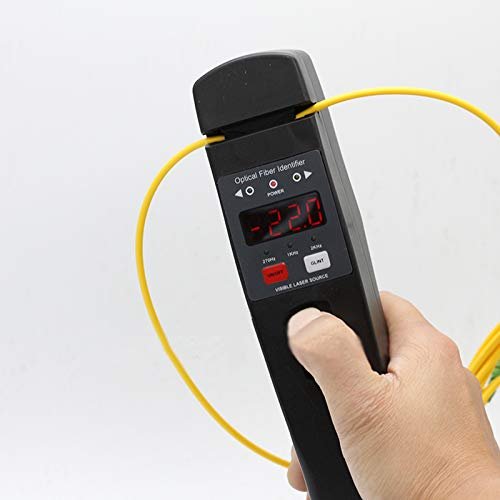
Both D YEDEMC fiber identifiers use macro-bending technology to detect signal presence, direction, and relative power on active fiber without cutting or disconnecting the link — critical for any job where traffic can't be interrupted. The basic JW3306D pairs identification with a built-in 10–15km VFL in a 200g LED-display unit. The YD-3309D adds a full optical power meter covering six wavelengths (850–1625nm) with a -50 to +26dBm range, turning a single pocket-sized tool into a 3-in-1 identifier, VFL, and power meter. Both detect tone signals at 270Hz, 1kHz, and 2kHz for tracing individual fibers in a bundled cable without an OTDR.

What to look for

  • Identifier only vs. identifier with OPM — the JW3306D covers identification and fault location; the YD-3309D adds a calibrated power meter if you also need absolute dBm readings on live links without pulling out a separate instrument
  • Wavelength detection reliability — 1310nm and 1550nm signals are easiest to detect via macro-bending; 850nm and 1300nm multimode signals are harder and may not register reliably on either model
  • Fiber size compatibility — both units handle 250µm, 900µm, 2mm, and 3mm fiber; confirm your cable outer diameter before ordering
  • Tone identification need — if you're tracing a specific fiber in a 48-fiber bundle at a splice closure, the 270Hz/1kHz/2kHz tone detection is what actually does that job; neither model is a substitute for an OTDR when you need full-link loss mapping

In this category

  • YD-3309D Identifier with OPM — 3-in-1 identifier, VFL, and power meter with 800–1700nm detection range, -50 to +26dBm OPM, metal gripper that handles multiple fiber sizes without an adapter swap, and LED color screen; 4.3/5 stars from 99 reviews
  • JW3306D Live Fiber Identifier — entry-level identifier with 800–1700nm detection, built-in 10–15km VFL, and tone ID at 270Hz/1kHz/2kHz; minimum detection at -35dBm (1550nm); 4.5/5 stars from 192 reviews

Using a Fiber Identifier on Live Networks

A fiber identifier detects optical signals on an active fiber without disconnecting it. That distinction matters: every other fiber test tool in this lineup requires either an unused fiber or a service interruption to work. The identifier works on a fiber carrying live traffic, which makes it the right tool for a specific set of tasks that nothing else handles.

How Macro-Bending Detection Works

The identifier clamps around the fiber and introduces a controlled bend — a macro-bend — that causes a small amount of light to leak out through the cladding. A detector inside the identifier picks up that leaked light and processes it to determine whether a signal is present, its direction, and whether it's modulated at a recognizable tone frequency. The process doesn't interrupt the signal; the amount of light extracted is small enough that the traffic on the fiber continues unaffected.

The catch is that not all fiber types leak light equally under a macro-bend. Single-mode fiber at 1310nm and 1550nm leaks most readily — these are the wavelengths that respond best to macro-bending detection. Multimode fiber at 850nm and 1300nm is harder to detect because the shorter wavelengths are more tightly confined within the fiber's guiding structure, and some fiber cladding types are thick enough to attenuate the leaked signal before it reaches the detector. Both the JW3306D and YD-3309D have a minimum detection threshold of -35 dBm at 1550nm and -30 dBm at 1310nm — signals weaker than that may not register. If you're working on an 850/1300nm multimode plant and the identifier isn't responding, that's the likely explanation.

D YEDEMC Live Optical Fiber Identifier with Wave Respond 800-1700nm Built in VFL FTTH Tool

The detector covers 800–1700nm overall, which spans essentially all telecom and CATV wavelengths in use. Both models use a 1mm InGaAs detector — the same detector type used in D YEDEMC's standalone power meters.

Tone Identification in a Bundle

The identifier recognizes tone frequencies — 270Hz, 1kHz, and 2kHz — modulated onto the optical signal by a tone generator at the far end. This is the fiber tracing function: if you have a large ribbon cable, splice enclosure full of pigtails, or an equipment room with dozens of identical patch cables, you inject a tone-modulated signal from a light source at one end and use the identifier at the other end (or along the route) to find the specific fiber carrying that tone. The identifier will indicate "tone detected at 1kHz" or similar, letting you sort through a bundle quickly without disconnecting anything.

This requires that you have access to a light source capable of tone modulation. The OLS function built into D YEDEMC's Mini-Pro OTDRs outputs at 270/330/1k/2kHz modulation frequencies — if you're already carrying an OTDR, you have the tone source. The tone frequencies on the identifiers (270Hz, 1kHz, 2kHz) match those available on the OTDRs.

JW3306D vs YD-3309D

The JW3306D is the entry-level model: fiber identifier plus a 650nm VFL with 10–15 km range. LED segment display. 200 grams, 230×43×48mm. It tells you whether a signal is present, its direction, the tone frequency if one is present, and it can trace breaks or bad connectors with the VFL. That covers most live-fiber identification scenarios.

The YD-3309D adds a fully functional OPM to that — measuring optical power at 850/1300/1310/1490/1550/1625nm with a measurement range of -50 to +26 dBm via the 2.5mm universal connector. It's genuinely a 3-in-1 instrument: identifier, VFL, and power meter in one 200-gram, 230×43×36mm housing. The metal gripper replaces the JW3306D's adapter with a direct-clamp design that doesn't require swapping accessories for different fiber sizes. For a technician who wants to identify a live fiber and immediately take a power reading without reaching for a second tool, the YD-3309D eliminates that extra step.

Neither model replaces an OTDR for fault location or link characterization. The identifier tells you a signal is present, its direction, its relative intensity, and whether it matches a tone you injected. It doesn't tell you where a splice is, what the splice loss measures, or whether the link is within loss budget. It's a field tool for answering "is this the right fiber?" and "is there signal on this fiber?" — two questions that come up constantly in active plant maintenance that an OTDR simply can't answer without taking the link down.

fiber fusion splicer

Six-Motor Core Alignment Splicers for Field Work

All three D YEDEMC fusion splicers use six-motor core alignment — the more precise method that images and aligns the actual light-carrying core rather than the outer cladding surface. That alignment approach targets ≤0.02dB SM fusion loss on the Ai-9 and Ai-20A, and ≤0.025dB on the entry Ai-6A, which is consistent with what professional splice techs expect from a core-alignment machine. The key differentiators across the three models are splice time (8 seconds on the Ai-6A, 5–6 seconds on the Ai-9 and Ai-20A), battery capacity (5,200mAh vs. 7,800mAh), and the Ai-20A's integrated electric cleaver — the only model in the lineup where you don't need a separate cleaving tool.

What to look for

  • Splice volume per charge — the Ai-6A manages approximately 200 splice-and-heat cycles on 5,200mAh; the Ai-9 and Ai-20A both run approximately 240 cycles on 7,800mAh — meaningful on a 200-splice run where a mid-job recharge is a real cost
  • Integrated cleaver need — the Ai-20A is the only model with a built-in electric cleaver; the Ai-9 and Ai-6A include a separate mechanical cleaver in the kit, which requires handling two instruments during prep
  • Splice time on high-volume jobs — 5 seconds vs. 8 seconds per splice adds up fast: a 200-splice run takes roughly 17 minutes of pure splice time at 5 seconds vs. 27 minutes at 8 seconds, not counting heat shrink
  • Fiber type coverage — all three models support SM (G.652/G.657), MM (G.651), DS (G.653), and NZDS (G.655); the 3-in-1 fiber holder handles bare fiber, pigtail, drop cable, and patch cord without swapping fixtures
  • Magnification for splice inspection — Ai-9 and Ai-20A reach 320x single-axis display; the Ai-6A reaches 300x — both are sufficient for core inspection before the arc fires, but check your local standards if you're doing certified splice documentation

In this category

  • Ai-9 Core Alignment Fusion Splicer — the most-reviewed splicer in the lineup at 4.4/5 from 103 reviews; 5-second splice time, 7,800mAh battery for ~240 cycles, 320x magnification, built-in OPM and VFL, 11 languages, SM/MM/DS/NZDS/BIF fiber support
  • Ai-20A Splicer with Built-in Cleaver — unique in the lineup for its integrated electric high-precision one-step cleaver; 6-second splice time, 7,800mAh battery, 320x magnification, and built-in OPM with 15km VFL — the kit where the cleaver is already in the machine
  • Ai-6A Entry Fusion Splicer — six-motor core alignment at a lower entry point; 8-second splice time, 5,200mAh battery for ~200 cycles, 300x magnification, 10 languages; the option for lower-volume jobs where splice speed and battery capacity are less critical

Core Alignment vs Cladding Alignment Splicers

Every fusion splicer in the D YEDEMC lineup uses six-motor core alignment. That's a specific technical choice that directly affects splice loss results, and it's worth understanding before comparing it against cheaper alternatives on the market.

How the Two Alignment Methods Work

A cladding alignment splicer positions the two fiber ends by aligning the outer glass surface — the cladding — using mechanical V-grooves or fixed electrodes. It's fast and mechanically simple, which keeps the cost down. But the light-carrying core of a single-mode fiber is only about 9 micrometers in diameter, sitting inside a 125-micrometer cladding. If the core isn't perfectly centered within the cladding — a manufacturing variation called core eccentricity — cladding alignment will produce a misaligned joint regardless of how well the cladding surfaces are matched.

D YEDEMC SM&MM Six Motor Core Alignment Fiber Fusion Splicer Automatic FTTH Fiber Optical Welding Splicing 5S Heating 15S (Ai

A core alignment splicer uses cameras and image processing to locate the actual core of each fiber, then adjusts the fiber position on all axes until the cores are aligned to within 0.1 micrometer. The D YEDEMC Ai-9 uses six motors to achieve this — two fibers, three axes each — with 320x magnification showing exactly what's happening before the arc fires. The result is lower, more consistent loss than cladding alignment, particularly on single-mode fiber where core size and eccentricity tolerances are tightest.

What the Loss Numbers Look Like in Practice

The Ai-9 targets ≤ 0.02 dB fusion loss on single-mode fiber, ≤ 0.01 dB on multimode. In practice, a well-prepared SM splice on a core alignment machine typically lands between 0.01 and 0.05 dB. Entry-level cladding alignment splicers — including several budget options that appear in Amazon search results alongside the D YEDEMC lineup — commonly produce SM fusion losses in the 0.05–0.1 dB range, with more variability splice-to-splice.

On a short FTTH drop with 5 or 6 splices, the difference between 0.02 dB and 0.08 dB per splice adds up to roughly 0.36 dB of extra loss over the full link. That's manageable. On a 200-splice backbone run, that same difference becomes 12 dB — which is a substantial chunk of your link budget and could mean the difference between a working link and one that needs re-splicing. Core alignment matters most when splice count is high and link budget is tight.

Ai-6A, Ai-9, and Ai-20A Side by Side

All three D YEDEMC splicers use six-motor core alignment and support SM/MM/DS/NZDS fiber types. The meaningful differences are splice speed, battery capacity, and the Ai-20A's integrated cleaver.

  • Ai-6A: 8-second splice time, 18-second heat cycle, 5,200mAh battery (approximately 200 splice-and-heat cycles), 300x magnification. The slowest and lightest battery in the lineup. For occasional splicing or learners who want core alignment without the full Ai-9 investment, it works. On a 200-splice run, the 8-second splice time versus the Ai-9's 5 seconds adds up to roughly 10 extra minutes of arc time alone — not counting the longer heat cycle.
  • Ai-9: 5-second splice time, 15-second heat cycle, 7,800mAh battery (approximately 240 splice-and-heat cycles), 320x magnification. The production workhorse — faster cycle time, larger battery, and higher magnification than the Ai-6A. The most-reviewed splicer in the D YEDEMC lineup at 4.4/5 from 103 verified ratings. Runs 11 languages including English, Spanish, French, and Arabic. This is the right choice for any technician doing regular splice work.
  • Ai-20A: 6-second splice time, 15-second heat cycle, 7,800mAh battery (approximately 240 splice-and-heat cycles), 320x magnification, built-in electric high-precision one-step cleaver. The integrated cleaver is what separates this model. Every splice requires a cleave — the precision cut of the fiber end that determines how flat and perpendicular the end face is before the arc fires. On the Ai-9 and Ai-6A, cleaving is a separate step with a separate tool. On the Ai-20A, the cleaver is built in and electrically actuated, which reduces setup time, eliminates the need to carry a separate cleaver, and removes one variable in the splice quality equation. The VFL range on the Ai-20A is 15 km. This is the model for technicians who want the cleanest workflow on a high-count splice job.

The Part the Splicer Can't Control

Honest note: even the best core alignment machine produces bad splices on poorly prepared fiber ends. Cleave quality matters as much as splicer alignment. A cleave angle greater than 1 degree will raise the splice loss regardless of how precisely the splicer aligns the cores — the end faces simply don't mate flush when the arc fires. Both the Ai-9 and Ai-20A include a fiber cleaver in the package; the Ai-20A integrates one directly into the machine. Strip quality, cleanliness of the stripped fiber, and consistent cleave length (8–16 mm for standard 250μm-coated fiber) are pre-splice steps that determine whether the splicer's alignment capability can actually deliver the ≤ 0.02 dB spec. The machine does its job best when the fiber prep is done right.

fiber optic connector cleaning kit

CLK-1 Cleans Every Standard Connector Type

The CLK-1 is a complete field cleaning kit covering 1.25mm ferrules (LC, MU) and 2.5mm ferrules (FC, SC, ST) plus MPO and D4 — every standard connector type a working tech is likely to encounter. It includes two cleaner pens rated for 800+ cleans each, two cassette cleaners rated for 550 cleans each, two replacement cassette tapes, an alcohol bottle, and 30 anti-static wipes, all in a carry bag. The correct cleaning sequence for fiber connectors is wet-then-dry: a drop of isopropyl alcohol from the included bottle on the ferrule, followed immediately by a dry wipe pass with the cleaning pen — this removes contamination without leaving alcohol residue that can attract dust.

What to look for

  • Match cleaner to ferrule size — the 2.5mm pen handles FC, SC, and ST adapters; the 1.25mm pen handles LC and MU; using the wrong size does not clean the ferrule and can damage the cleaner tip
  • Pen vs. cassette for different situations — the cassette cleaner works well on in-adapter ferrules (connectors seated in a port); the pen works better on bare ferrules and pigtail ends out of the adapter
  • Replacement tape planning — each cassette gets 550 cleans before the tape is used up; the kit includes two replacement tapes, so you have roughly 1,650 cassette cleans total before you need to reorder
  • Anti-static wipes for first-pass cleaning — the 30 included wipes are useful for initial contamination removal on heavily soiled connectors before the pen or cassette finishes the job

In this category

  • CLK-1 Connector Cleaning Kit — complete cleaning kit for FC/SC/ST/LC/MU/D4/MPO connectors with 1.25mm and 2.5mm cleaner pens (800+ cleans each), two cassette cleaners (550 cleans each), replacement tapes, alcohol bottle, anti-static wipes, and carry bag; 4.6/5 stars from 28 reviews

Which D YEDEMC Tool Fits Your Job

D YEDEMC's five product lines aren't redundant — they answer different questions on a fiber job. An OTDR maps an entire link from one end. A power meter tells you the signal level at a specific point right now. A fiber identifier works on active fiber without cutting anything. A fusion splicer makes the permanent joint. A cleaning kit keeps all of it working accurately. Which one you need first depends entirely on what you're trying to figure out.

If you're doing FTTx drop installations, build verification, or access network maintenance, the Mini-Pro OTDR line is the core tool. It maps splice locations, identifies fault events, measures link loss, and confirms build quality from a single handheld unit — all without needing a technician at the far end of the run. The built-in OPM, VFL, and RJ45 tester mean you're not carrying three separate instruments for a standard FTTx commissioning job. This is the right starting point for independent contractors and telecom field techs who need a single workhorse device.

If you already have an OTDR — or if you're a network engineer who just needs to verify that a fiber link is live and within loss budget — the OPM-VFL-1 is the more practical choice. It's pocket-sized, runs for over 72 hours on two AA batteries, measures optical power at ±0.05 dB accuracy across 8 wavelengths (850 through 1650nm), and includes a VFL and RJ45 tester. You don't fire up a full OTDR every time you need to confirm a link-down isn't the fiber's fault. This tool answers that question in about 10 seconds.

If you're working on a live PON network — GPON, FTTH active plant — and you need to measure signal levels without taking the service down, the YD-300A PON Power Meter is the specific tool. Standard OTDRs can't test active fiber; they'll burn out trying. The YD-300A reads 1310/1490/1550nm simultaneously through the FC/SC APC interface, which is exactly what you need to verify an OLT-to-ONT link on a running GPON network without disrupting anything.

The fiber identifier line — JW3306D and YD-3309D — fills a different gap entirely. When you're working in a splice enclosure or equipment room and need to identify which specific fiber in a bundle carries the signal you're looking for, without disconnecting anything, that's the identifier's job. It detects the signal through a controlled bend in the fiber without breaking the link. The YD-3309D adds a built-in OPM to that, so it can also give you a relative power reading at the same time. These tools don't replace an OTDR — they complement it on jobs where the fiber is live and identification is the problem, not fault location.

The fusion splicer line — Ai-6A, Ai-9, and Ai-20A — is for anyone who's making permanent splices. All three use six-motor core alignment, which matters for consistent low-loss results on single-mode fiber. The Ai-9 is the most-tested option in the lineup, with a 5-second splice time and 7,800mAh battery good for about 240 splice-and-heat cycles. The Ai-20A adds an integrated electric cleaver, which eliminates the separate cleave step and reduces the number of things that can go wrong on a high-count splice job. If you're splicing occasionally, the Ai-6A covers it at a lower entry point. If you're running splice-heavy FTTH builds regularly, the Ai-9 or Ai-20A are the right tools for the pace.

Finally, the CLK-1 cleaning kit isn't optional — it's what keeps your OTDR readings accurate and your splice loss numbers honest. A contaminated connector can make a clean link look like it has a 2 dB fault. The kit covers 1.25mm ferrules (LC, MU) and 2.5mm ferrules (FC, SC, ST) with 800+ cleans per pen and 550 per cassette. It belongs in every fiber tech's bag regardless of which D YEDEMC tools they're running.

D YEDEMC Fiber Gear vs the Competition

D YEDEMC competes at a specific price tier in the fiber optic test equipment market. Being honest about where that tier sits — and where it doesn't — is more useful than pretending there's no difference between a Mini-Pro OTDR and an EXFO MaxTester 720C. There is a difference. The question is whether that difference matters for the work you're actually doing.

OTDRs — vs EXFO, Viavi, and WANLUTECH

At the top of the OTDR market, EXFO's MaxTester 720C and Viavi's MTS series are the instruments used by Tier 1 carriers for backbone fiber characterization, long-haul acceptance testing, and certified measurement reporting. These instruments offer dynamic ranges of 40+ dB, sub-meter dead zones, and software ecosystems built around carrier-grade reporting standards. They also carry price tags in the thousands of dollars per unit. If you're characterizing a 400km undersea fiber span or delivering IEC-standard acceptance test reports to a major carrier, that's where you go.

The D YEDEMC Mini-Pro OTDR lineup tops out at 28/26 dB dynamic range on the YD-5100-APC. That's genuinely sufficient for FTTx access network builds, enterprise campus fiber, CATV maintenance, and runs up to roughly 80–100 km in favorable conditions. It's not sufficient for long-haul backbone characterization. That's not a criticism — it's a positioning fact. The Mini-Pro is designed for the jobs most working technicians and small contractors actually run, not for Tier 1 carrier test lab work.

WANLUTECH appears in direct comparison video searches alongside D YEDEMC — both brands occupy the same budget-friendly OTDR tier on Amazon. The comparison is functionally close at similar dynamic range specs, and the competitive choice between them typically comes down to interface preference and support experience rather than a meaningful spec difference. What distinguishes D YEDEMC in this comparison is community track record: the r/networking endorsement calling the Mini-Pro "an OTDR that doesn't feel like crap garbage" is a genuine signal from working technicians that the instruments deliver what they claim in the field.

Fusion Splicers — vs Fujikura, Sumitomo, and Vevor

Fujikura's 90S+ and Sumitomo's Type-72C+ are the reference standards in professional fusion splicing. They deliver documented splice losses under 0.01 dB on single-mode fiber with extremely consistent results across a full electrode life, and they're built to withstand the daily abuse of a full-time splice crew for years. INNO's View 8+ also appears in professional recommendations. These are the tools recommended without qualification on r/FiberOptics when someone asks what a serious splicer should buy — and the price matches the reputation.

The D YEDEMC Ai-9 competes on core alignment accuracy (≤ 0.02 dB SM target) and per-splice speed (5 seconds) at a significantly lower entry point. The 4.8-star average from 226 reviews cited on third-party product aggregators, and 4.4/5 from 103 verified Amazon ratings, suggest real-world users are getting results consistent with the spec. Where the Ai-9 falls short of the Fujikura/Sumitomo tier is long-term durability data — the premium brands have decades of field history behind their reliability claims, and D YEDEMC doesn't have that track record yet. For a technician building a first kit, doing steady FTTH installation work, or running a small crew where the economics of a Fujikura 90S+ don't add up, the Ai-9 is a genuinely capable choice. For a full-time splice crew running 10,000+ splices a year on backbone fiber, the premium brands are worth the investment.

At the low end, Vevor and similar entry splicers that appear in r/networking cheap-splicer threads typically use cladding alignment rather than core alignment. As discussed in the splicer decision guide, cladding alignment produces higher average SM splice loss — typically 0.05–0.1 dB versus the Ai-9's ≤ 0.02 dB target. For anything beyond occasional splice work on short runs, core alignment is worth the step up.

Optical Power Meters — vs Viavi OLP-87/88

Viavi's OLP-87 and OLP-88 are professional-grade OPMs used in lab environments, carrier-level certification work, and anywhere measurement traceability to NIST standards is required. They offer calibration certificates, higher absolute accuracy specifications, and integration with Viavi's test management software. For a working field technician verifying FTTx drop loss or checking link signal levels, those capabilities aren't what drives the purchasing decision.

The D YEDEMC OPM-VFL-1 delivers ±0.05 dB accuracy across 8 wavelengths, runs for over 72 hours on two AA cells, and fits in a shirt pocket. It covers the measurement range needed for real-world fiber link verification (-70 to +6 dBm) with FC/SC/ST universal interface. The built-in VFL and RJ45 tester add functionality that neither the OLP-87 nor OLP-88 include. For the working technician who needs a daily-carry instrument that handles OPM, VFL, and cable testing without a separate device for each, the OPM-VFL-1 hits a practical value point that the Viavi instruments don't compete at.

The honest summary: D YEDEMC's lineup is the right choice for technicians and small shops doing FTTx installation, access network maintenance, enterprise campus fiber, and CATV service work — jobs where the Mini-Pro OTDR's dynamic range is sufficient, where core alignment splice quality matters but Fujikura-tier investment doesn't make business sense, and where multi-function tools reduce kit bag weight and per-job setup time. It's not the right choice for Tier 1 carrier acceptance testing, long-haul backbone characterization, or splice-critical backbone infrastructure where every 0.01 dB counts. Knowing which category your work falls into is the whole decision.

See the OPM Function Running in the Field

We pulled this walkthrough because it covers something a lot of buyers want to see before committing — the optical power meter function on an affordable handheld tester, running live. You'll watch the presenter work through the OPM operation step by step, which gives you a real sense of what the interface looks and feels like outside of a spec sheet. He's honest that budget testers aren't for everyone, and we respect that — but if you're trying to decide whether a compact OPM fits your actual workflow, this is a practical place to start.

What D YEDEMC Users Say After Real-World Testing

"I've been running FTTx drops in residential builds for three years and the Mini-Pro OTDR YD-4000 26dB Touch has become my daily driver. The 2.5-meter event dead zone is the reason I bought it — dense splice enclosures need that resolution. My one gripe: the button labels could be a bit more intuitive on first boot, but I had it figured out inside an hour."
— Derek P., Independent Fiber Contractor, on fiber optic otdr tester
"Our MSP had a couple of link-down situations last quarter where we needed to know if the fiber was at fault before calling a contractor. The Mini-Pro OTDR YD-3000 UPC handled both jobs — identified a connector issue at 14.3km on the first run. The built-in OPM and VFL in the same unit meant we weren't digging through a bag for three separate tools. Accuracy matched what we verified with a calibrated meter afterward."
— Marissa T., Network Engineer / IT Infrastructure Pro, on fiber optic otdr tester
"The OPM-VFL-1 All-in-One Power Meter does exactly what it says across all 8 wavelengths, and ±0.05 dB accuracy holds up when you compare it against a known reference. The AA batteries are a real advantage in the field — I'm not hunting for a USB port in a splice truck at 7 a.m. The RJ45 tester bundled in saves me carrying a separate cable verifier. I'd buy it again without hesitation."
— Carl W., Telecom / CATV Field Technician, on fiber optic power meter
"The Ai-9 Core Alignment Fusion Splicer surprised me. I was skeptical that a core-alignment machine at this price tier would actually deliver consistent loss numbers, but I was seeing 0.02–0.03 dB on SM fiber across a 40-splice run, which is exactly what the spec claims. The 7800mAh battery held through an entire day of splicing without a charge. The included cleaver works, but I'd upgrade it if you're doing serious volume work."
— Jonah M., Independent Fiber Contractor, on fiber fusion splicer
"I picked up the YD-3309D Identifier with OPM for live plant work — being able to confirm signal presence and direction without taking down the link is the whole point. The built-in OPM reading at 1550nm checked out against my standalone meter. One thing to know going in: 850/1300nm detection is trickier with this type of tool, as the product documentation does mention, but 1310/1550nm works reliably for the GPON work I do."
— Bree H., Telecom / CATV Field Technician, on optical fiber identifier
"I'm still learning fiber — came from copper networking — and the CLK-1 Connector Cleaning Kit was a solid starting point. Both cleaner pens, the cassette cleaners, and the wipes all cover the connectors I work with daily (SC, LC, FC). The 800+ cleans per pen means I'm not replacing it every other month. Nothing exotic here, just a complete kit that covers the bases without me sourcing pieces from five different places."
— Aaron S., First-Time Fiber Learner / Hobbyist Builder, on fiber optic connector cleaning kit

Questions Buyers Ask About D YEDEMC Equipment

Which Mini-Pro OTDR model handles FTTx drop installation?

The Mini-Pro OTDR YD-3000 UPC or APC is the standard choice for FTTx work. Its 24/22 dB dynamic range at 1310/1550nm covers single-mode access network runs up to 60km, and the 3-meter event dead zone resolves closely spaced events in splice enclosures — a real requirement on dense FTTH builds. Check Amazon for current availability on the specific connector variant you need.

Can you use a D YEDEMC Mini-Pro OTDR on live fiber?

Standard Mini-Pro models — including the YD-3000 and YD-5100 series — cannot be used on active fiber. Connecting a standard OTDR to a live fiber can damage the instrument. The YD-3000-1610-UPC and YD-3000-1610-APC are specifically designed for live-fiber testing, operating at 1610nm with a built-in filter that separates test pulses from active traffic signals on the same fiber.

What is a good dBm reading on a fiber link?

For most passive optical links in FTTH and enterprise environments, a received power between -10 dBm and -25 dBm is normal operating range. Readings above -10 dBm may indicate the receiver is being overdriven; readings below -25 dBm suggest the link is approaching its loss budget limit and warrants inspection. The OPM-VFL-1 All-in-One Power Meter reads down to -70 dBm, well beyond any typical operational scenario.

What does dynamic range actually mean for OTDR selection?

Dynamic range tells you how much total loss an OTDR can measure across before the signal becomes unresolvable. The YD-3000 series at 24 dB covers FTTx access network builds comfortably. The YD-5100 APC 28dB — the highest in the D YEDEMC lineup at 28/26 dB — extends the useful test range to 100km and handles longer enterprise campus runs. Neither model is designed for Tier 1 carrier long-haul characterization, which typically requires 40+ dB.

What is the difference between an OPM and an OTDR?

An optical power meter measures absolute signal strength at one specific point on the link, expressed in dBm. An OTDR maps the entire fiber run from a single end, showing every splice, connector, and fault event with distance and loss data. The OPM-VFL-1 All-in-One Power Meter handles link verification and loss budget checks; the Mini-Pro OTDR is the tool for fault location and full-link characterization.

How does the YD-300A PON Power Meter differ from the standard OPM?

The YD-300A PON Power Meter APC is purpose-built for live GPON/FTTH network testing, measuring all three PON wavelengths — 1310/1490/1550nm — simultaneously without disrupting active traffic. The standard OPM-VFL-1 covers 8 wavelengths (850–1650nm) for general use but isn't optimized for simultaneous PON wavelength separation. If you're doing live ONT verification or OLT-to-ONT link confirmation, the YD-300A is the right tool.

What is the difference between UPC and APC connector versions?

UPC (Ultra Physical Contact) connectors produce a flat polish and are standard in most enterprise and data center environments. APC (Angled Physical Contact) connectors use an 8-degree angled polish that reduces back-reflection, making them the standard for FTTx and PON networks where back-reflection causes signal degradation. Connecting a UPC OTDR to an APC network connector — or vice versa — introduces significant loss. Match the connector type to your network.

What splice loss should the Ai-9 Core Alignment Fusion Splicer produce?

The Ai-9 is rated for ≤0.02 dB on single-mode fiber and ≤0.01 dB on multimode fiber under normal conditions with proper fiber prep. In practice, consistently hitting those numbers requires clean cleaves — the quality of the cleave affects the splice result as much as the splicer itself. The six-motor core alignment system images the actual fiber core before firing the arc, which is what separates it from cladding-alignment machines in the same price range.

How does the YD-5100 Multimode OTDR differ from the single-mode models?

The Mini-Pro OTDR YD-5100 Multimode operates at 850/1300nm — the wavelengths used in multimode fiber — rather than the 1310/1550nm of the single-mode lineup. It's the correct instrument for in-building multimode runs, data center cross-connects, and campus MM links. Its 1.5-meter event dead zone is shorter than the YD-3000 series (3 meters), which helps when resolving closely spaced events on shorter MM runs. It's not interchangeable with single-mode testing.

Is a VFL the same as an OTDR?

No. A visual fault locator shoots a visible red laser (650nm) down the fiber so breaks, bad bends, and dirty connectors glow visibly through the jacket — it's a fast, simple continuity check. An OTDR sends timed pulses and measures backscatter to produce a detailed trace with distance and loss data for every event on the link. The OPM-VFL-1 integrates a VFL for quick checks; when you need actual event data and distance measurements, you need the OTDR.

What connector types does the YD-3309D Identifier with OPM support?

The YD-3309D uses a 2.5mm universal connector interface, which accepts FC, SC, and ST connectors directly. For the fiber identification function, the metal gripper clamp accommodates 250μm, 900μm, 2mm, and 3mm fiber types without changing adapters. The built-in OPM reads six calibration wavelengths: 850/1300/1310/1490/1550/1625nm, covering both multimode and single-mode work from a single handheld unit.

How often should fiber connectors be cleaned?

Clean every connector every time before mating — no exceptions. A contaminated connector end face is the leading cause of high insertion loss and reflectance in fiber links, and contamination transfers from a dirty connector to a clean one on contact. The CLK-1 Connector Cleaning Kit includes both 1.25mm and 2.5mm cleaner pens rated for 800+ cleans each, plus cassette cleaners for adapter-mounted connectors, covering FC, SC, ST, LC, MU, D4, and MPO.

Why D YEDEMC Builds a Complete Fiber Toolkit

D YEDEMC — manufactured by Yide Machinery Co., Ltd. — started where most fiber test equipment brands do: with the tools that working technicians reach for on every job. The optical power meter line came first. It solved a real problem — finding an OPM that measured accurately across the wavelengths you actually work with, without paying for a brand name attached to features you'd never use in the field. The OPM-VFL-1 All-in-One Power Meter, now rated 4.6/5 across 1,328 reviews, is the clearest proof that the approach worked.

But power measurement alone doesn't get you through a fiber job. A technician running FTTx drops needs to locate faults, not just confirm signal presence — so the Mini-Pro OTDR series followed. Seven models now span single-mode at 1310/1550nm, multimode at 850/1300nm, and a 1610nm variant capable of testing active fiber without disrupting live traffic. The fiber fusion splicer line — the Ai-6A, Ai-9, and Ai-20A — filled the next gap. All three use six-motor core alignment, producing ≤0.02 dB SM fusion loss, because a tool that makes bad splices costs you more in re-work than it saves on purchase. The Ai-20A added an integrated electric cleaver, reducing the number of separate instruments a tech needs to bring to a job. The optical fiber identifier line — the JW3306D and YD-3309D — addressed a specific operational need: identifying active fibers and confirming traffic direction on live networks without cutting or disconnecting anything. And the fiber optic connector cleaning kit, the CLK-1, rounds out the toolkit with 1.25mm and 2.5mm cleaner pens, cassette cleaners, and anti-static wipes covering every connector type from LC to MPO.

The thread connecting all five lines is practical: every product has to pull its weight on a real job site. D YEDEMC doesn't compete with Viavi or EXFO at the Tier 1 carrier level, and they're transparent about it. What they do is give independent contractors, network engineers, telecom technicians, and people learning the trade access to equipment with real specs — verified dynamic ranges, documented splice loss numbers, confirmed dead zone measurements — at a price point that doesn't require a fleet procurement budget. The r/networking community put it plainly: the Mini-Pro OTDR is "an OTDR that doesn't feel like crap garbage." That's not a marketing line. That's the review that matters.

Useful Guides

Field technicians rely on the right diagnostic tools to solve problems fast—here's what actually works on the job.

D YEDEMC on Amazon

All D YEDEMC products — OTDRs, power meters, fiber identifiers, fusion splicers, and the connector cleaning kit — are available through the D YEDEMC Store on Amazon.com. Amazon's product pages include full specification listings, customer review histories, and availability status for each model. Visit the D YEDEMC Store on Amazon to browse the complete 16-product lineup and check current stock on specific models.

Customer Support

Support for D YEDEMC products is handled through Amazon's messaging system. Navigate to your order in your Amazon account and use the "Contact Seller" option to reach the D YEDEMC support team. The brand's listings note a commitment to resolving issues through Amazon messaging — for technical questions about specific models, trace interpretation, or compatibility, reach out directly through that channel.

Warranty and Returns

Warranty and return terms for D YEDEMC products follow Amazon's standard seller policies and are detailed on each individual product listing. For warranty claims or replacement requests, initiate contact through Amazon's buyer-seller messaging on the relevant order. Specific warranty durations vary by product — check the listing for the product you're purchasing before ordering.